

Special service mailbox for minors: service@gwsvip.com
(Service time:10: 00-19: 00)
Minor growth guardian: parent guidance
Gamewinner Technology strictly enforces the "Notice of the National Press and Publication Administration on Further Strict Management and Effectively Preventing Minors from Independling Online Games". It is only on Friday, Saturday, Sunday, and statutory holidays. (Refers to citizens under 18 years of age) Provide 1 hour online game service, and do not provide online game services to minors in any form.
If you want to manage your children playing games with stricter standards, you can set the corresponding settings in your child's mobile phone. The following will be based on the Android system and the iOS system to detail the corresponding setting steps.
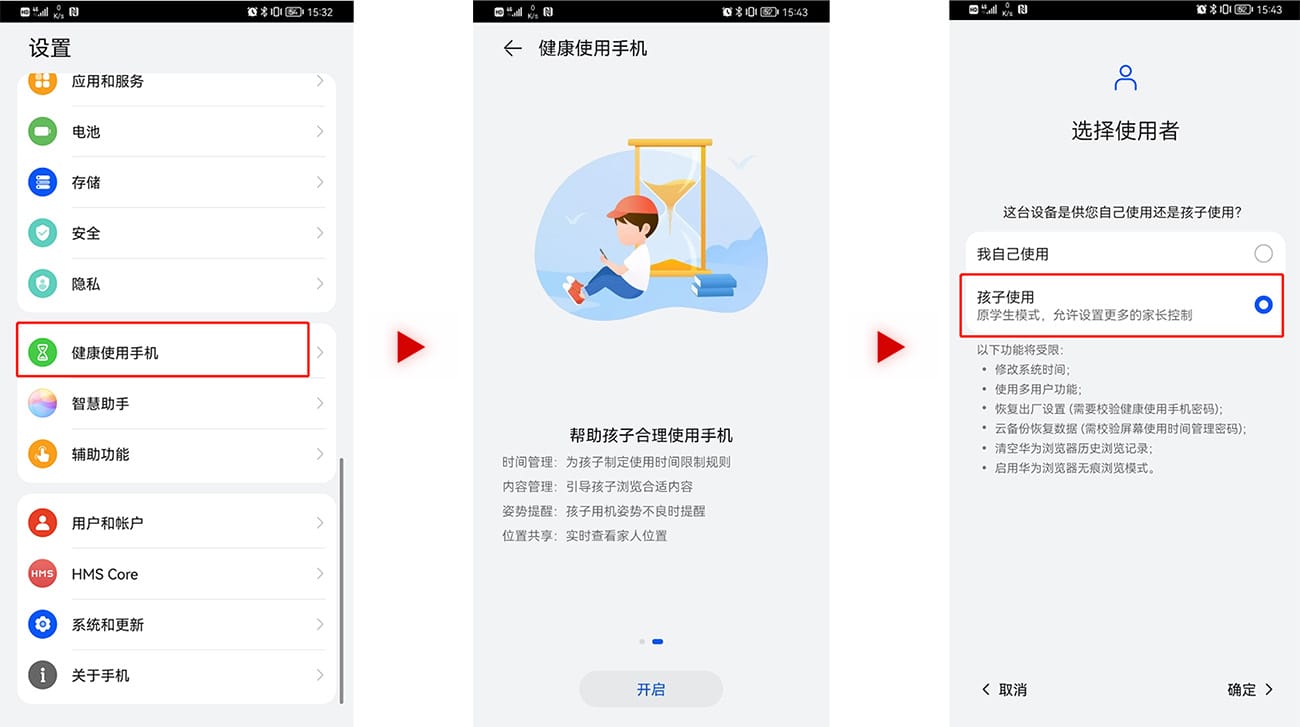
Steps of Android System (Taking Huawei Mobile as an example):
Step 1: Open the mobile phone [Settings] function interface, select [Health use mobile phone], click to check [Child use] to enter the setting page, set the password (please note that the password is confidential, it is recommended not to be consistent with the phone lock screen password. Try to set you as much as possible The password that children are not easy to know) and secret protection issues.
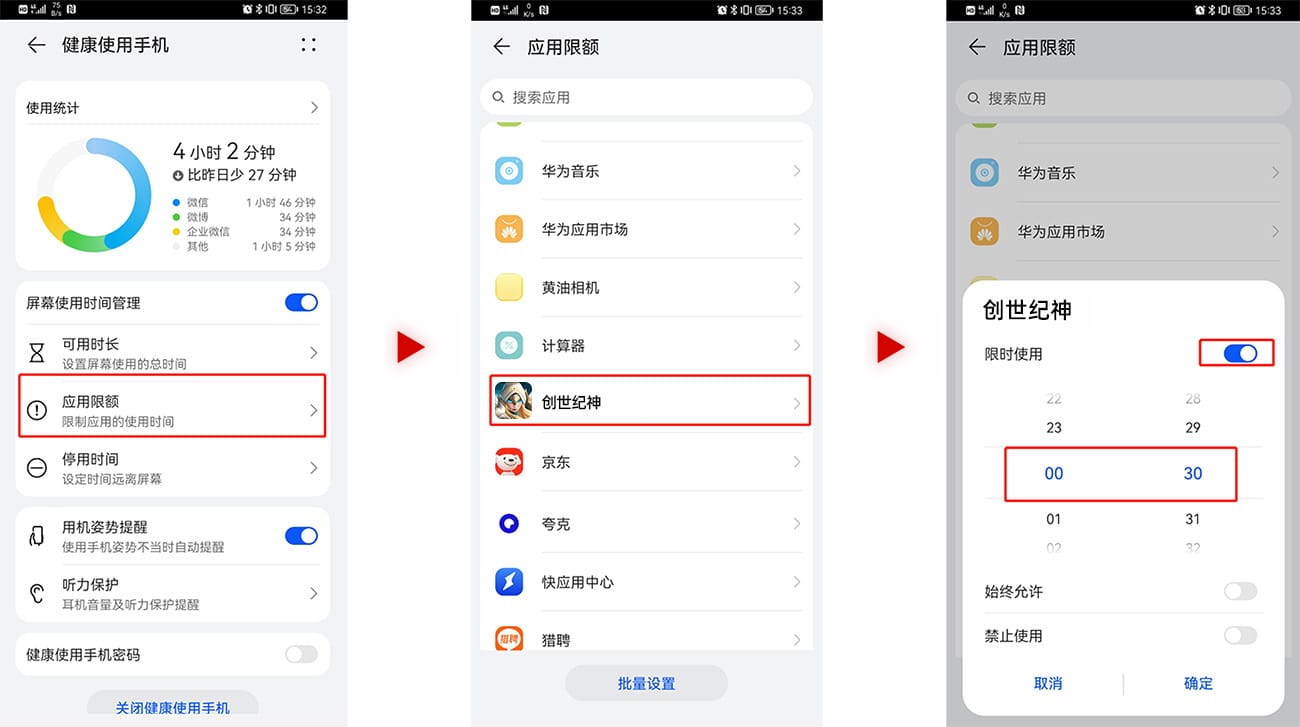
Step 2: After entering the healthy use of the mobile phone settings page, click [Application Limits] to find the game app you want to manage your child's play time. After clicking to enter, you can set the daily use time of the game by yourself.
The relevant functional setting methods of other Android system mobile phones can be contacted to the customer service of related brands for consultation:
Xiaomi Mobile Customer Service Hotline 400-100-5678
vivo Mobile Customer Service 400-678-9688
OPPO Mobile Customer Service 400-199-9666
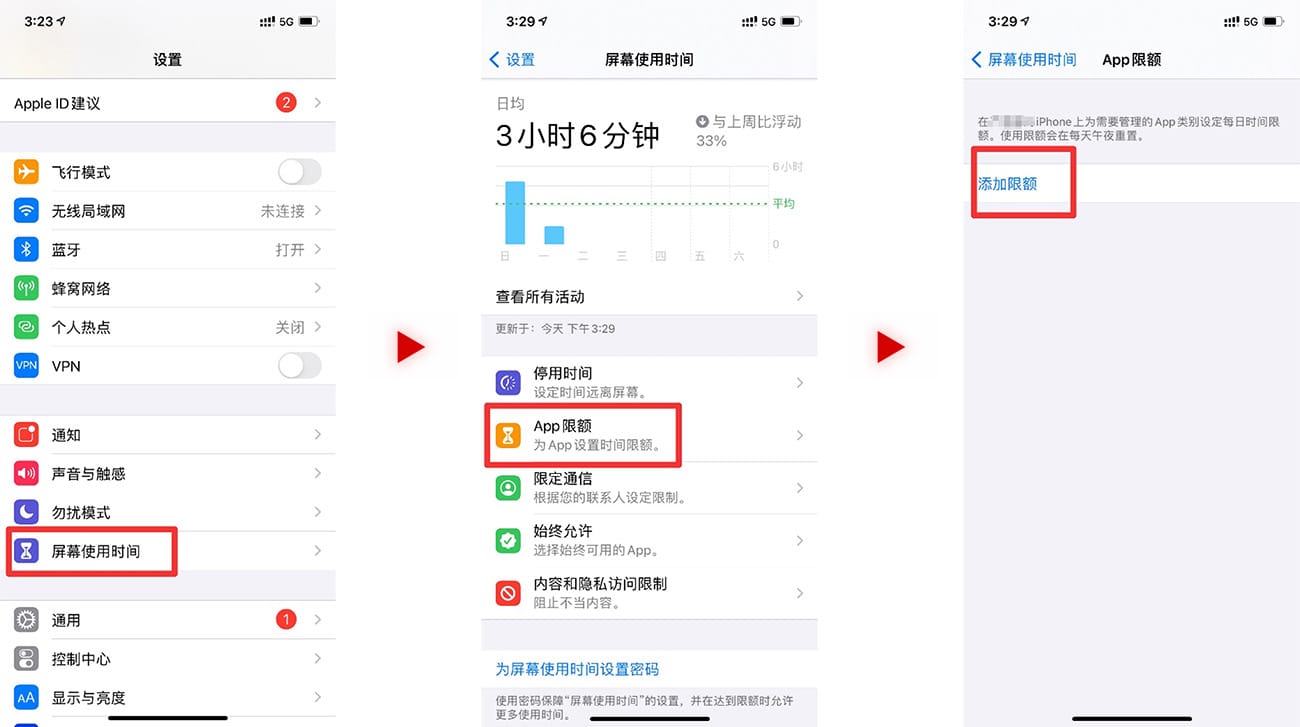
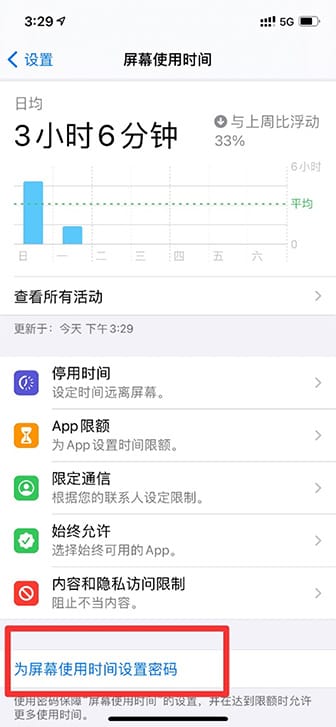
Step steps for iPhone mobile phones (take iOS14.3 as an example):
Step 1: Open the [Settings] function page, click on the [APP Limited] interface in [Screen Usage], click [Add Limited], and find the category of "Game" according to the APP classification.
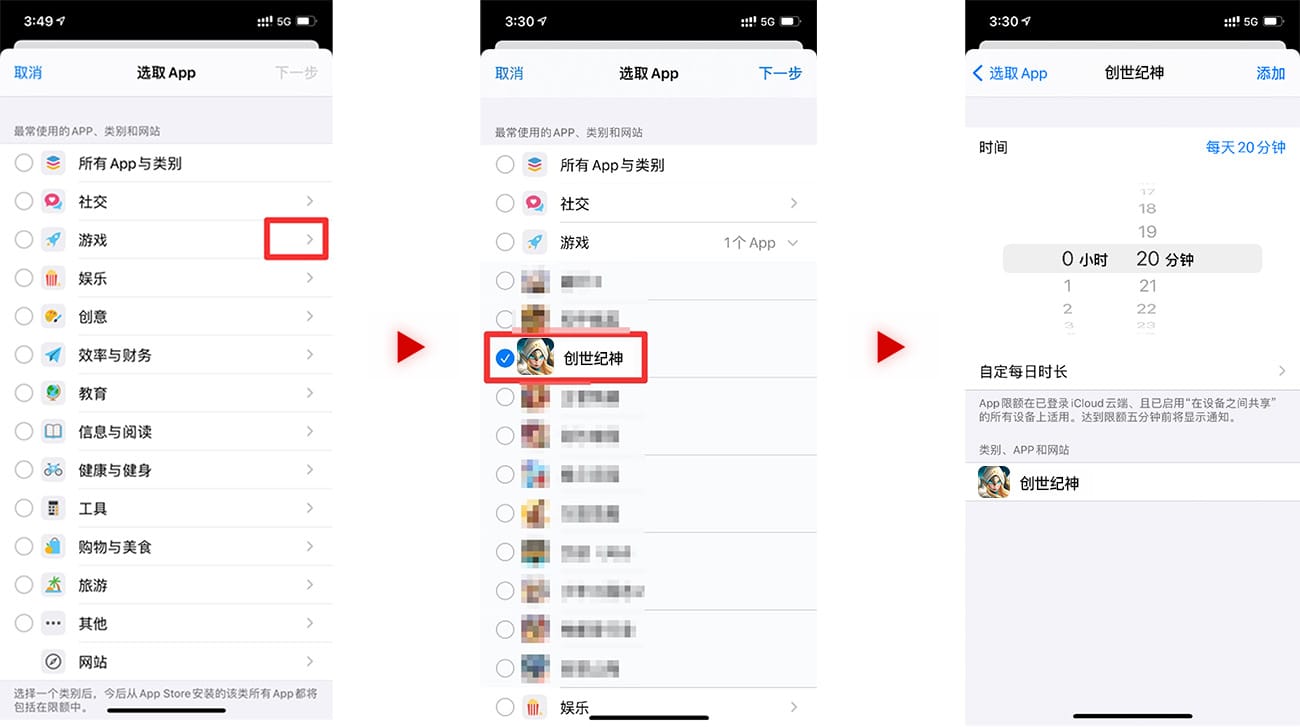
Step 2: Click the arrow on the right, start the drop -down box, select the corresponding game app you want to manage, and click the next step to perform the game app limited management page, and you can set the daily limit duration.
Step 3: In order to prevent children from changing the APP limit settings by themselves, the password can be set for the screen usage time. You can click on the [Set the Password for the Screen Usage Time] in [Screen Usage], and set your own password (please note that the password is confidential, it is recommended not to be consistent with the mobile phone lock screen password, try to set your child's difficulty to know).
Minor refund application
1. Submit the appeal information
You need to provide the following information:
Game name, game ID, character name, ID card, parent -child relationship certificate, other auxiliary information for consumer behavior of minors, and your contact information (mobile phone or QQ), please send the above information to the mailbox: service@gwsvip.com We will have a special person for review.
2. Review and communication
After the information is provided, the customer service will be reviewed based on the content submitted, and will contact you in two tasks to confirm and feedback results in detail.
3. Confirm the refund amount
If the review meets the refund conditions, the customer service will check the refund amount and the refund will be initiated after approval.
After the refund is successful, the refund account will be permanently closed and unable to log in.
common problem
Q1. According to the National Press and Publication Department issued on November 19, 2019, the National Press and Publication Agency's Notice on Prevention of Minors' Online Games, and the National Press and Publication Agency on August 30, 2021 Strict management and effectively preventing the notice of minors from adding to online games ", minor players logging in the game will be subject to the following limits:
(1) Time limit
All online game companies can only provide 1 hour services to minors from 20:00 to 21:00 on Friday, Saturday, Sunday, and statutory holidays. Other times, they must not provide online game services to minors in any form.
(2) Consumption restrictions
Under 8 years of age (excluding) cannot be recharged;
8 to 16 years old (including 8 years of age, not 16 years old), the amount of recharge for a single recharge must not exceed 50 yuan, and the monthly recharge must not exceed 200 yuan;
The age of 16 to 18 (including 16 years old, not 18 years old), the amount of recharge must not exceed 100 yuan, and the monthly recharge amount does not exceed 400 yuan.
Q2. What information do you need to provide when applying for minors?
First of all, you need to provide basic account information for situation verification. Game name, server, game number ID (click the avatar to see), character name.
You also need to provide the description of the specific situation of minor games, which detailed the game behavior of minors and proof available for evaluation.
Please send the above information to the special service mailbox of minors: service@gwsvip.com.
Q3. How long will I receive a reply after sending the email?
We will reply to you in 24 hours.
Q4. What is the follow -up process after submitting the information?
After submitting the relevant application information, our company will have a professional staff to evaluate. During the processing process, the applicant or the respondent may request a return visit (the return visit includes but is not limited to the telephone and email form) to verify Human identity and monitoring relationship, as well as the authenticity and accuracy of information, hope you will cooperate.
Reminder: No staff will ask you to ask you password information, please pay attention to your account security.
Q5. How to apply for a minor refund?
If your child has a consumption that is not adapted to the child in the game without your consent, you can apply for a refund.
For detailed procedures for the refund of minors, please refer
Q6. Children are still playing games other than the time limit of minors' anti -induction game time limit, or the amount of recharge is higher than the upper limit of the amount of anti -addiction of minors. What are the reasons?
Children use the elders ID card to complete the real -name authentication, induced the elders to enter the payment password or perform face recognition to complete the payment.
Prevention measures: Please keep your elders in your own ID card and do not disclose your ID number to your children. Remind the elders: The face is the password, don't easily help your child face face recognition. If face recognition is performed, you must inform parents in time.
Children purchase "adult real -name authentication accounts" or "agent face recognition (commonly known: face) service" from some platforms or privately, bypassed the game time limit and consumption restrictions of minors.
Prevention measures: Regularly check whether the child and parent online shopping accounts have consumer records of keywords such as "generation", "buying numbers", "over -face", and "lease account". If the child deletes the relevant orders, you can also get clues in Alipay or WeChat's bill details. Parents can also contact the e -commerce platform directly and ask for illegal services to be removed.